01
Assess your documents.
Scan local folders or shared drives. Find accessibility issues and inspect the evidence behind each finding.
PDF · Microsoft Office · OpenDocument
DOCUMENT ACCESSIBILITY + PROJECT MANAGEMENT
DocLoupe helps state, local, and territorial governments within the United States proactively improve document accessibility to meet their obligations under federal law. Find issues in PDF, Microsoft Office, and OpenDocument files, prioritize fixes, and track your work.
DocLoupe helps you do the work. It does not promise or certify compliance. Read the Department of Justice’s guidance on web accessibility and the ADA.
Designed to run entirely offline once installed. No network access required.
WindowsmacOSLinuxComing soon.
BUILT FOR THE PERSON DOING THE WORK
Whether you work for a city, county, state agency, or territorial government, you may have a pile of documents, limited time, and no dedicated team. DocLoupe helps you turn that assignment into work you can organize and tackle.
Scan local folders or shared drives. Find accessibility issues and inspect the evidence behind each finding.
PDF · Microsoft Office · OpenDocument
Use prioritized results and practical guidance to turn a collection of problems into a manageable next step.
Priorities · previews · remediation guidance
Built-in activity tracking records your work alongside project decisions and comments. Gather and show evidence of an active accessibility compliance program when needed.
Activity tracking · decisions · project history
FROM FINDING TO NEXT STEP
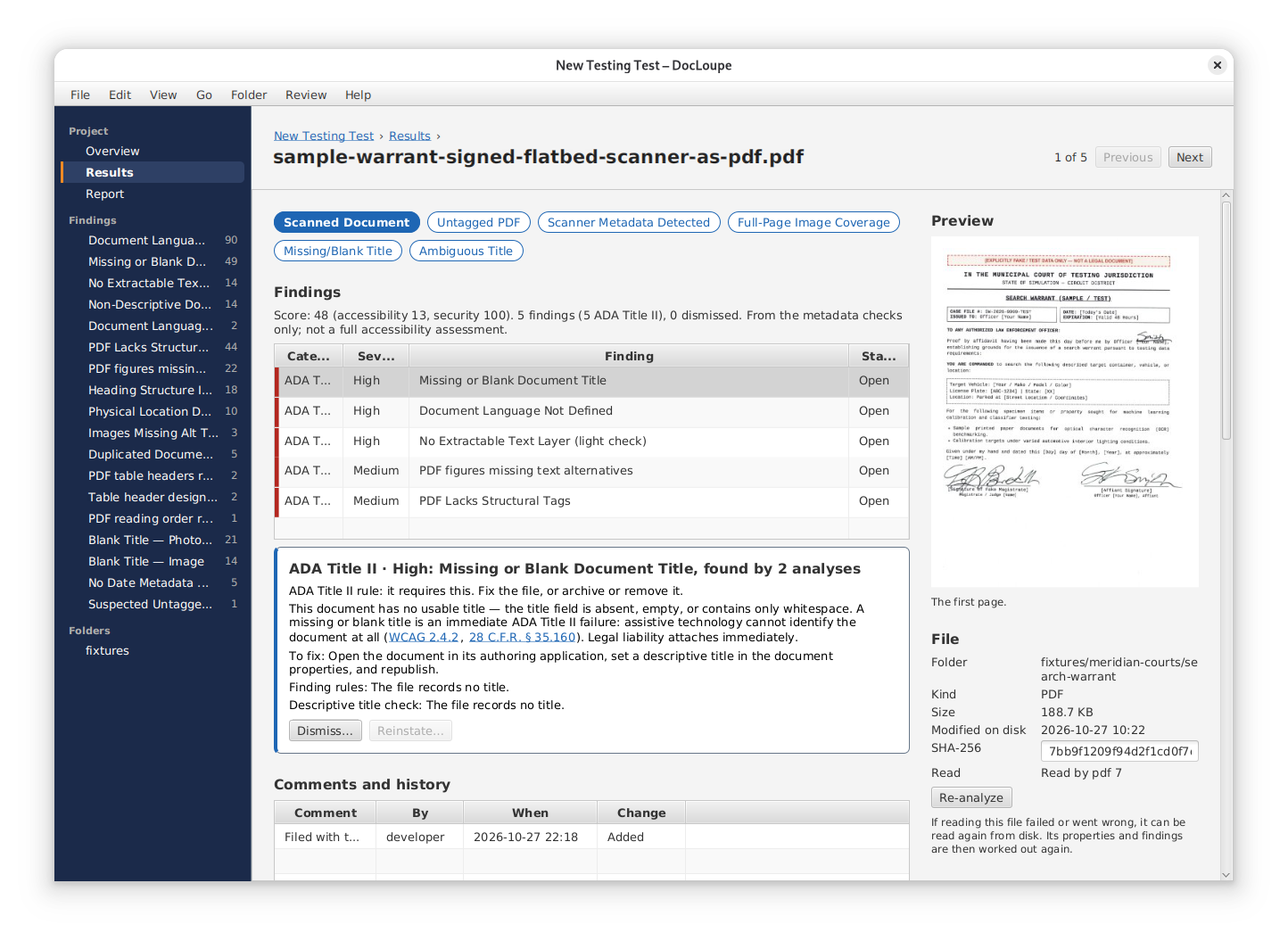
Review a document’s findings and evidence, then keep decisions and comments with the project. This early preview uses a fictional sample warrant.
UNDERSTAND WHAT NEEDS FIXING
SMALL OMISSIONS. REAL BARRIERS.
A filename or visible heading does not replace the document’s title property. A meaningful title helps screen reader users identify the file they have opened.
Screen readers use the language declared in a document to choose pronunciation rules. Without it, otherwise readable words can become difficult to understand.
Bold, centered text can remain an ordinary paragraph to a screen reader. This false heading hides the structure a reader needs to navigate sections.
Use real heading styles and preserve them when exporting. WCAG requires visual structure to be available programmatically or in text.
Without designated header rows or columns and their associations, a screen reader cannot reliably give each value its context.
Add a descriptive caption or equivalent label so readers can identify the table. Captions do not replace headers, and bolding the first row does not establish them.
WCAG 1.3.1 · Table relationships ↗
W3C guidance on table captions and summaries ↗
Covered organizations have a federal duty to provide effective communication. Documents that deny screen reader users equally effective access can violate that obligation. Read the Department of Justice’s effective-communication guidance ↗
These examples are a starting point. Image alternatives, reading order, and other issues also matter. Automated findings support assessment; human review and screen reader testing remain important.
LOOK AT THE COLLECTION, TOO.
DocLoupe examines documents together as a corpus and flags titles reused across the collection. “Meeting minutes” may work for one file. After someone downloads several months of minutes, hearing that same title for every file makes them hard to distinguish.
A title-present check misses that collection-level barrier. Use distinguishing titles such as “Board meeting minutes, January 2026.”
Document corpus: Rietta’s glossary definitionILLUSTRATIVE EXCERPT FROM A COLLECTION
A title is present in each file. It does not tell the reader which file is which.
DIRECT ANALYSIS. ORIGINAL FORMATS.
Read PDF, Office, and OpenDocument files directly, including legacy binary Word files. No Office-to-PDF conversion required.
.docx .xlsx .pptx.doc .xls .ppt.odt .ods .odp.pdfChecks vary by format. More file formats are coming.
YOUR COMPUTER. YOUR DOCUMENTS.
DocLoupe is designed for air-gapped computers and local networks without external connections. Scan the files you select, whether your operating system makes them available on a local disk, network-attached storage, or another mounted location. Your source files stay unchanged.
Read DocLoupe’s Privacy PolicyNo uploads. No phone homes.
COMING SOON
Professional software for Windows, macOS, and Linux.
Microsoft Store and direct download planned.
First store launchMac App Store to follow. Current target: January 2027.
Planned nextDirect download planned.
Coming soonPRICING PREVIEW
$20/month
Microsoft Store first, with the Mac App Store to follow.
Get launch updatesTry it on your desktop.
A limited free trial is planned. Discounted direct licensing and bundles are under consideration.
Ask about licensingPricing and offers are being finalized. Final terms will be published at launch.
In development. Store listings and download links will appear here at launch. Release timing may change.
OPTIONAL FEATURES, PLANNED NEXT
A fully lock-free, multi-user workflow is planned for network drives, Dropbox, and similar sync tools. Bring a colleague into the project to share findings, comments, and progress without a central DocLoupe server.
Full lock-free board editing and sync workflows are still in development.
Use an OpenAI-compatible endpoint and your own bearer token, including a local server or an endpoint on your intranet. No DocLoupe API dependency.
When enabled, requests go to your chosen endpoint under its operator’s policies. Core local analysis works without AI.
BEFORE YOU GET STARTED
People working for state, local, and territorial governments within the United States, often told to “fix this” with limited time, little budget, and no dedicated team. Start independently on your desktop. Shared team workflows are planned, not a prerequisite.
You paid for those CPU cores. DocLoupe is designed to put them to work. Its highly multithreaded, lock-free scanner makes full use of your available CPU cores and fast SSD storage, especially on a desktop. Documents are analyzed locally, without waiting for an upload or a remote scanning queue.
In early tests, DocLoupe analyzed 167 documents in 4 seconds on a MacBook Pro with the original M1 chip and in 9 seconds on a virtual machine. More real-world measurements are coming. Your results will depend on your hardware and the nature of your documents, which determines which checks run.
No. It scans documents on your computer or shared drives. Crawling websites to discover publicly published documents and their defects requires enterprise Metadata Minder. Some advanced vision, TrueDate™, and TrueContext™ functionality also requires enterprise Metadata Minder.
No. DocLoupe runs on desktop and laptop computers with a full Windows, macOS, or Linux operating system and direct access to your document collection. iPhone, iPad, and Android apps are not planned.
No. It directly analyzes PDF, modern and legacy Microsoft Office files, and OpenDocument files used by LibreOffice and Apache OpenOffice. It is not a veraPDF wrapper, and Office files do not need to be converted to PDF first. Checks vary by format.
A title can be present in every file yet fail to distinguish documents in a collection. DocLoupe identifies repeated-title patterns that become barriers when someone downloads multiple files. See Rietta’s document-corpus definition.
No. DocLoupe does not phone home or upload documents to Rietta. It is designed to require no network access once installed and to work on air-gapped computers. It can read the files you select wherever your operating system makes them available, including local disks and network-attached storage. Optional AI integration is planned, not yet available. If you enable it in a future release, AI requests will use only the endpoint and authentication you configure. Otherwise, DocLoupe runs entirely offline or on your local network without external connections.
Rietta does not manage Microsoft Store or Mac App Store systems and cannot speak for their connections or network checks. Website contact forms are processed separately by Netlify, as explained in the DocLoupe Privacy Policy.
No. Core analysis works without AI or a DocLoupe API. Planned opt-in AI support will use your OpenAI-compatible endpoint and bearer token, including on an intranet.
No. It assesses files and helps you organize remediation. Review the guidance, make changes in your authoring tool, and scan again. Source files are not modified by scanning.
Both are from Rietta Cybersecurity. DocLoupe puts document assessment and project management on your desktop. Enterprise Metadata Minder adds website discovery and broader analysis.
DocLoupe also surfaces hidden metadata, including location information in photos, so you can review what travels with a file before publishing it.
Yes. Federal agencies can purchase DocLoupe licenses directly from Rietta instead of using the Microsoft Store or Mac App Store when the application launches.
Rietta Inc. is a U.S. small business with an active registration in the U.S. government’s System for Award Management (SAM.gov). Our Unique Entity ID is T7P7APUCFF46, and our CAGE code is 26J29.
DocLoupe is developed by Rietta Cybersecurity, a U.S.-based software firm in Alpharetta, Georgia. The legal publisher is Rietta Inc. We’re building DocLoupe as a broadly available desktop application, with a focus on helping U.S. state, local, and territorial governments improve document accessibility. Learn about Rietta Cybersecurity.
A DIRECT LINE TO THE TEAM
Ask a question or tell us what would help you get started.
Prefer to talk about DocLoupe? Call Rietta at +1 (770) 623-2059.
Monday through Friday, 9 a.m. to 5 p.m. Eastern. If we miss your call, please leave a message.
For launch updates, select the optional email checkbox. No purchase required.
This website form is processed by Netlify. The desktop app’s core analysis runs locally. Read our Privacy Policy.